Business Model Canvas template for Word
A one-page canvas you type straight into, plus two pages of block-by-block filling instructions.
Free .docx, instant download, no signup. Works in Word, Word Online, and Google Docs.
By The BMC Templates TeamLast updated
What's inside this file
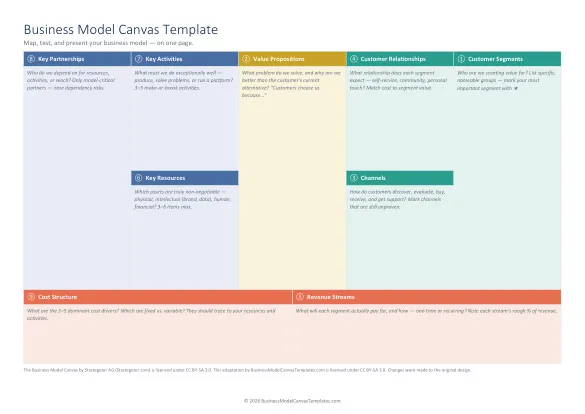
- The 9-block canvas in the classic layout, sized to one page
- Fill-order numbering 1 to 9, so you always know where to start
- Guiding questions inside every block, written in the customer-first method
- 2 pages of block-by-block instructions with the classic mistakes to avoid
- The 6 consistency checks that separate a coherent model from nine lists
- Standard fonts, no macros: opens clean in Word, LibreOffice, and Google Docs
Why Word is the right format for a written canvas
Word is the best format when your canvas needs to read like a document: a startup assignment, a section in a funding application, an internal one-pager your team will comment on. Unlike a whiteboard tool, a .docx file is something you own, attach, print, and version without anyone creating an account.
Most Word canvases on the internet are a bare table with nine labels. Ours is closer to a worksheet: every block contains the guiding questions professionals ask (for Customer Segments: "Who are our most important customers? Who is the user, and who is the payer?"), and the two pages after the canvas walk each block in the recommended order with the common mistakes flagged.
How to use the template in Word
1. Read the instruction pages first (5 minutes)
Pages 2 and 3 explain each block in fill order. Skimming them first prevents the classic error of filling the canvas left to right, which starts you at Key Partnerships, the block you know least about on day one. The right entry point is Customer Segments, paired with Value Propositions.
2. Type directly into the blocks
Click into a block and type over the hint text. Keep entries short: three to six bullet points per block beats paragraphs. If a point does not fit on one line, it is usually two ideas pretending to be one.
3. Mark facts versus assumptions
Bold the entries you have evidence for and leave guesses in regular weight (or use Word's highlight tool). A canvas where everything looks equally certain hides your riskiest assumption, and the riskiest assumption is the one that kills companies.
4. Run the consistency checks
The template ends with six checks, including: every value proposition points at a named segment, every revenue stream traces to a segment paying for a specific value proposition, and every key resource exists because something on the right side demands it. Five minutes of checking catches the "nine disconnected lists" problem that makes reviewers stop reading.
Word template vs the other formats
Choose Word when the output is a document someone will read. Choose PowerPoint when you are presenting or running a workshop, Excel when you want a structured grid that prints as a poster, and the fillable PDF when you want to fill on screen without any Office app, or print for a sticky-note session. All the files carry the same canvas and guidance, so switching formats never loses the method.
Printing and page setup
The document is set to landscape with narrow margins and prints on A4 and US Letter without cutting off the canvas. For workshops, print one canvas per participant plus one A3 enlargement for the table. If your printer shrinks the layout, check that "Scale to fit" is off and margins are set to the template's defaults.
Quick reference: the 9 blocks and their fill order
Get all 5 formats in one download
Word, PowerPoint, Excel, and both PDF sizes in a single ZIP. Tell us where to send it.
Instant delivery. No spam, unsubscribe anytime.
Free template vs the Complete Toolkit
| What you get | Free templates | Complete Toolkit ($39) |
|---|---|---|
| The 9-block canvas, professionally designed | Yes, in 5 formats | Yes, plus a canvas that assembles itself in Excel |
| Guiding questions in every block | Yes | Yes, plus dropdowns and Fact / Assumption / Idea status |
| Real-company examples | No | 10 complete canvases: PDF + editable PowerPoint |
| Revenue, break-even, and unit-economics models | No | Yes, formulas built in (MRR, CAC, LTV, payback) |
| Guided workbook | 2 pages of instructions | 25-page consultant-style field manual |
| Pitch deck | No | Light + dark themes with a presenting guide |
| Lean Canvas, SWOT, Value Proposition Fit | No | All three, editable |
One-time purchase. Works in Microsoft Office and Google Workspace. Instant download through Lemon Squeezy.
Get the Complete Toolkit