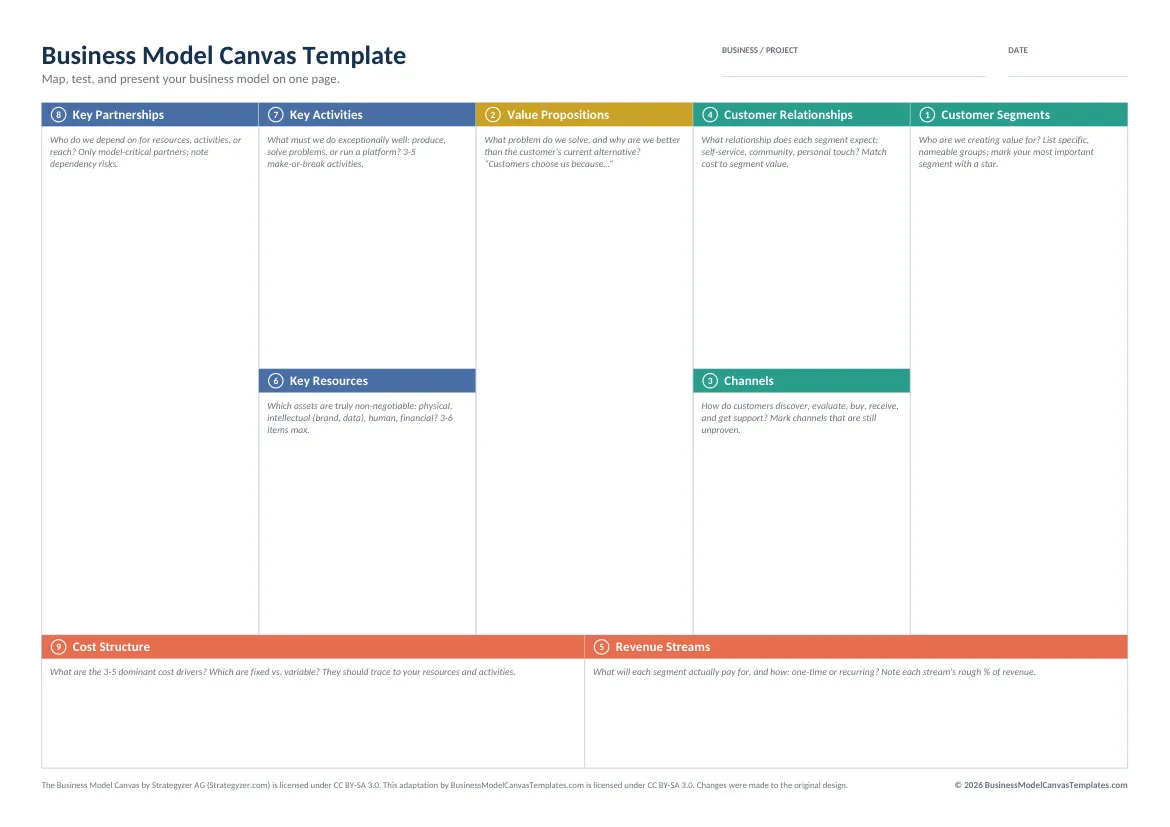
Business Model Canvas template as a fillable PDF
Type into it on screen or print it blank for sticky notes. Both A4 and US Letter included.
Free fillable PDF, instant download, no signup. US Letter version is one scroll below.
By The BMC Templates TeamLast updated
What's inside this file
- Real fillable form fields in all 9 blocks: type, save, re-edit
- Both page sizes included: A4 and US Letter
- Prints blank as the classic workshop canvas, clean up to A0
- Guiding questions and fill-order numbering in every block
- Opens in any PDF reader: Acrobat, Preview, Edge, Chrome, mobile apps
- Vector-based: no pixelation when a print shop enlarges it
One format, two very different jobs
The PDF version earns its place twice. On screen, the form fields make it the fastest way to fill a canvas without opening an Office app: open, type, save, send. On paper, printed blank, it is the classic workshop canvas that the whole method was designed around: a wall, sticky notes, and a team standing up.
Both page sizes ship because printing an A4 layout on US Letter (or the reverse) quietly shrinks the canvas and leaves lopsided margins. Pick your region's size and the grid fills the page the way it should.
Using the fillable fields
Fill in the numbered order, not left to right
Each block carries its fill-order number and guiding questions. Start at Customer Segments, pair it with Value Propositions, and leave Cost Structure for last, when the left side has told you what actually costs money. The full sequence, with a worked example, is in the how-to guide.
Keep entries phone-screen short
Form fields do not expand, and that constraint is a feature: if an entry does not fit, it is not sharp enough yet. Three to six entries per block is the professional norm.
Save iterations, not overwrites
Save as canvas-v1.pdf, canvas-v2.pdf as the model evolves. The canvas is a hypothesis board; being able to look back at what you believed three months ago is worth more than a tidy folder.
Printing for a workshop
For a table session, print one canvas per person plus one A3. For a wall session, any print shop can enlarge the PDF to A1 or A0 without quality loss because the file is vector-based. Use one sticky-note color per customer segment, one idea per note, thick marker. If notes pile up in one block, that block is hiding more than one decision.
US Letter version
Same canvas, sized for 8.5 x 11 inch paper:
PDF vs the editable formats
The PDF trades structural editability for zero friction and perfect printing. When you need to restructure the canvas, work multi-canvas comparisons, or keep living documents, switch to Word, PowerPoint, or Excel. Same content, same method, editable structure.
Quick reference: the 9 blocks and their fill order
Get all 5 formats in one download
Word, PowerPoint, Excel, and both PDF sizes in a single ZIP. Tell us where to send it.
Instant delivery. No spam, unsubscribe anytime.
Free template vs the Complete Toolkit
| What you get | Free templates | Complete Toolkit ($39) |
|---|---|---|
| The 9-block canvas, professionally designed | Yes, in 5 formats | Yes, plus a canvas that assembles itself in Excel |
| Guiding questions in every block | Yes | Yes, plus dropdowns and Fact / Assumption / Idea status |
| Real-company examples | No | 10 complete canvases: PDF + editable PowerPoint |
| Revenue, break-even, and unit-economics models | No | Yes, formulas built in (MRR, CAC, LTV, payback) |
| Guided workbook | 2 pages of instructions | 25-page consultant-style field manual |
| Pitch deck | No | Light + dark themes with a presenting guide |
| Lean Canvas, SWOT, Value Proposition Fit | No | All three, editable |
One-time purchase. Works in Microsoft Office and Google Workspace. Instant download through Lemon Squeezy.
Get the Complete Toolkit